
I found a small solar panel (with plastic case) behind my old apartment building one day when I was fetching something that had blown out the window. I was able to find it online, and it turns out it came with a solar-powered water pump, or something similar. It has a 2.1mm DC plug. I decided to make a backup battery pack that could be charged with this panel, with USB power output. My phone is constantly running low on battery power, and I have several other devices which are powered by USB now, including an e-cigarette charging box. Although USB charging is very convenient (because I sit in front of a computer all day), it's annoying not having an option for power in situations where I'm not at home, work, or in the car... and it doesn't even really come up that often for me. Given that I've wanted to try out using solar power in some form, it seems logical that I should build this.
Adafruit sells a rechargeable Li-Poly battery (JST), as well as a recharging board with USB and 2.1mm power inputs on board (in case the solar panel doesn't work or has to be replaced), with two JST ports and two battery 2-pin terminal blocks. The board also incorporates LEDs to show the state of the battery, and if there's an error.
 |
| $17.99 - adafruit.com |
I'm going to solder on a 2-pin terminal block in the battery out position, and connect a USB receptacle:
I've laid out everything after choosing some enclosures that are suitable from Polycase (drawings to be posted later):
 |
| Polycase LP-41P: $2.98 |
The Adafruit PCB will be mounted on the "bottom" of the enclosure with #6-32 10mm (total length) standoffs, inverted with the hex inner thread facing downward, with flathead machine screws on the outside, and matching nuts holding the PCB. The USB receptacle will be mounted on the side of the enclosure opposite the PCB. Using a Dremel, I'm going to cut out USB and 2.1mm slots in the box. I'm also hoping to cut out some stylized vents for airflow and to easily see the LEDs.
To keep the battery from clunking around, I'm going to use half of the Polycase KT-40 to house it on the underside of the main enclosure lid:

Using the Dremel, I'm going to alter anything for fit and venting.
3/30/11: It turns out the power output of the battery pack to devices won't be enough to charge or power them with the setup outlined above, but adafruit says the addition of their Mintyboost completed board will increase the output voltage to 5V. It's most likely going to be placed in between the USB receptacle and the charging board, connected to the board via the terminal block, and connected to the receptacle via USB interface (instead of splicing wires). Unfortunately, adding this will also add $19.50 to the cost of the pack.
There are also a few items on adafruit.com which seem useful that I'm going to order while I'm at it. Their solar panels are also very cheap (starting at $10.00).
 |
| $6.00! |
 |
| $28.00 |
Total cost (excluding solar panel, shipping, and tools): about $60.00.
Parts List:
1. LP-41P Enclosure (1)
2. KT-40 Enclosure (1)
3. #6-32 10mm Standoffs (4)
4. #6-32 Nuts (4)
5. #6-32 3/16" Flathead Philips Screws (4)
6. Adafruit Charging Board - ID: 280 (1)
7. 2-pin PCB Terminal Block (1)
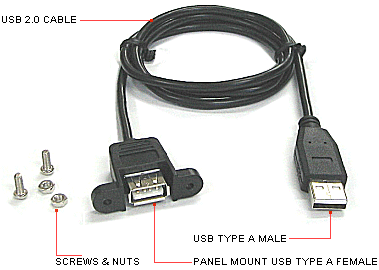
8. USB Type A Female with plastic mounting assy. and cord (1)
9. Adafruit Medium Lithium Ion Polymer battery - ID: 258 (1)
10. Adafruit Mintyboost Kit - ID: 14 (1)
* * *
Here are the drawings I've come up with so far:

 |
| Case Screw Locations (left), and Device-In Side View |
 |
| Power Input Port Side View: 2.1mm and mini USB jacks' positions are estimated |

I was trying to find space for the Mintyboost charging adapter PCB within the case, but it looks like I'll probably just have to wing it. I think it'll fit somewhere, but with all of the USB jacks plugged in inside the case, it'll probably be tight. I guess I can always splice wires, but it's not my first choice.

No comments:
Post a Comment